See which AI bots crawl your site
XPmetric shows which AI bots crawl your site, such as GPTBot, ClaudeBot, PerplexityBot and ChatGPT-User, which pages they read and which of those pages return a 404. Most of these bots fetch raw HTML and never run a browser script, so a small server-side package or a WordPress plugin reports each visit to your Bot Traffic card.
Recognized bots are counted apart from your human pageviews and do not use your event allowance.
Which bots does it recognize?
XPmetric matches the user agent against a catalog of 39 named crawlers and sorts each into one of four classes. The lists below are that catalog, not a sample.
AI answer fetch
answer_fetchDashboard tab: AI answersAn AI assistant fetching your page while a person waits for an answer.
- ChatGPT-User
- Claude-Web
- Perplexity-User
- Google-NotebookLM
- Grok-DeepSearch
- xAI-SearchBot
Search indexer
search_indexDashboard tab: IndexingSearch engines and AI search indexes building their list of pages.
- OAI-SearchBot
- PerplexityBot
- Googlebot
- Google-InspectionTool
- Storebot-Google
- Bingbot
- DuckDuckBot
- YandexRenderResourcesBot
- YandexBot
- Sogou web spider
- Baiduspider
- Applebot
- Slurp
AI training
trainingDashboard tab: TrainingCrawlers that collect pages to train AI models.
- GPTBot
- ClaudeBot
- anthropic-ai
- Google-Extended
- GoogleOther
- Google-CloudVertexBot
- CCBot
- meta-externalagent
- FacebookBot
- Bytespider
- Amazonbot
- cohere-ai
- Diffbot
AI crawler
ai_crawlerDashboard tab: TrainingOther known AI crawlers. The dashboard shows them on the Training tab.
- GrokBot
- xAI-Bot
- YouBot
- AI2Bot
- ImagesiftBot
- omgili
- Timpibot
A crawler whose user agent is not in the catalog is not reported as a bot.
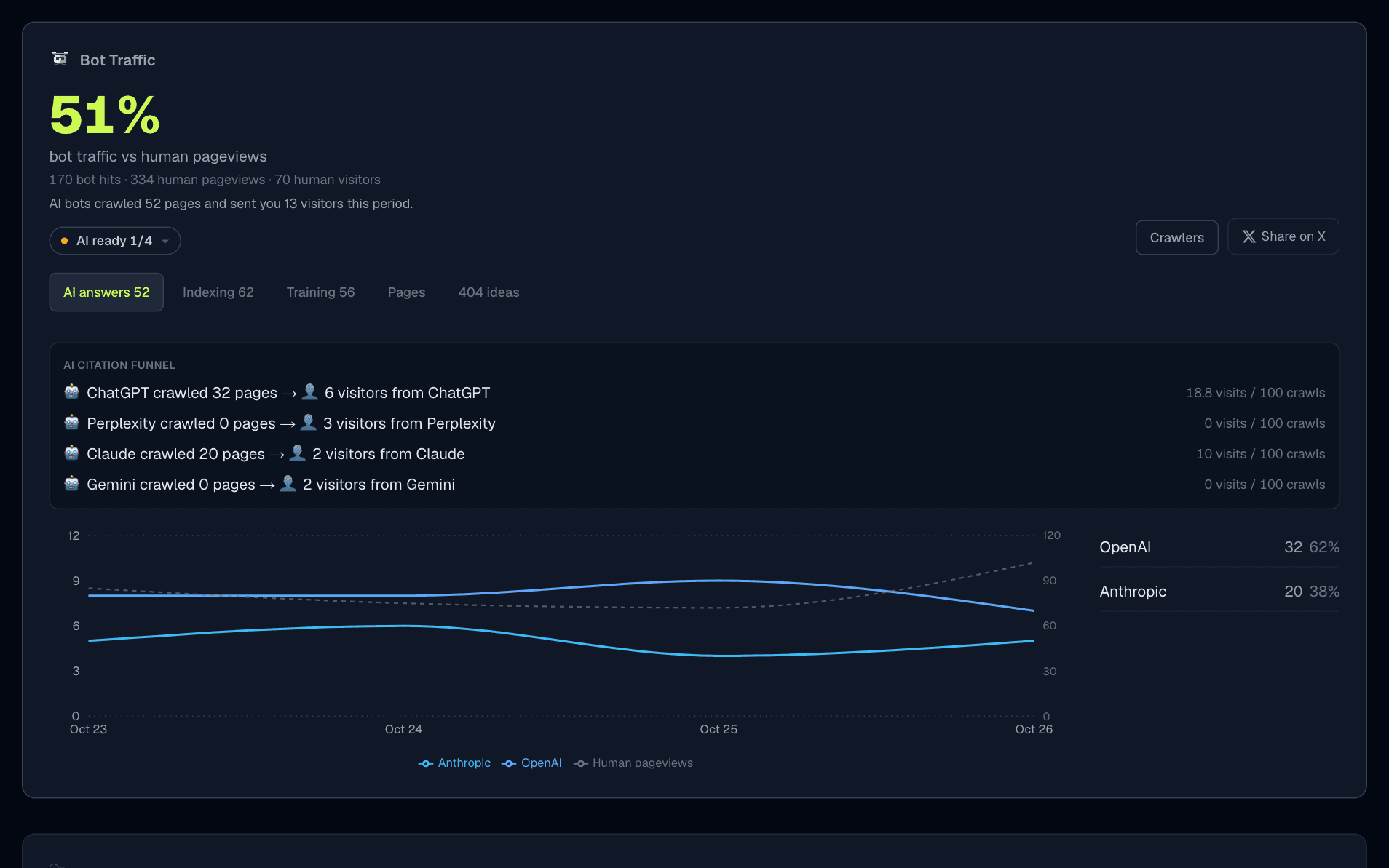
What do you see in the dashboard?
Bot traffic against human pageviews
One ratio at the top of the card, with the bot hits and human pageviews behind it.AI answers, Indexing and Training
A trend per class over the period you pick, and the providers ranked by hits, such as OpenAI, Anthropic and Perplexity.AI citation funnel
On the AI answers tab, the pages an assistant's bots crawled next to the visitors that arrived from that assistant: ChatGPT, Perplexity, Gemini or Claude.Pages
Which of your pages the bots read, with a search over paths.404 ideas
Paths bots requested that returned a 404 or 410, with hit counts and the bots that asked. Build the page or redirect it.AI ready
A chip that checks four things: an llms.txt file, robots.txt not blocking the major AI bots, a sitemap that bots crawl, and no bot 404s. The AI-crawlable guide walks through each one.
How do I install it?
Copy your site token from Settings → Sites → Get Script. The snippets below are the ones in the @xpmetric/ai-crawl README and the bot tracker guide.
npm install @xpmetric/ai-crawlNext.js
import { NextResponse, type NextFetchEvent, type NextRequest } from "next/server";
import { trackCrawlerRequest } from "@xpmetric/ai-crawl";

export function proxy(request: NextRequest, event: NextFetchEvent) {
  const requestHeaders = new Headers(request.headers);
  requestHeaders.set("x-xpm-pathname", request.nextUrl.pathname);

  trackCrawlerRequest(request, event, {
    siteToken: "YOUR_SITE_TOKEN",
  });

  return NextResponse.next({ request: { headers: requestHeaders } });
}

export const config = {
  matcher: ["/((?!api|_next/static|_next/image|favicon.ico).*)"],
};
On Next.js 15 or earlier, name the file middleware.ts and export middleware. Proxy cannot see the final status of an App Router page, so it reports volume only. To get real 404s, also report from app/not-found.tsx: the snippet is in the guide.
Express
import express from "express";
import { createExpressCrawlerMiddleware } from "@xpmetric/ai-crawl";

const app = express();
app.use(
  createExpressCrawlerMiddleware({
    siteToken: "YOUR_SITE_TOKEN",
  })
);
The status code is captured when the response finishes.
Cloudflare Workers
import { withCrawlerTracking } from "@xpmetric/ai-crawl";

export default {
  fetch: withCrawlerTracking(
    async (request) => fetch(request),
    { siteToken: "YOUR_SITE_TOKEN" }
  ),
};
WordPress
- Download XPmetric Bot Tracker 1.2.0 and check it against its SHA-256 checksum.
- In WordPress admin, go to Plugins → Add New Plugin → Upload Plugin, install the ZIP and activate it.
- Open Settings → XPmetric Bot Tracker, paste your site token, turn on Enable bot tracking and save.
- Click Send test hit. A successful result says the hit was accepted, and the path
/xpmetric-testappears in Bot Traffic, usually within a minute.
The plugin can also add the browser script for human pageviews. It is checked by default for a new install, and the plugin refuses to add a second copy if it finds one. A page cache that answers before WordPress loads needs an early-load fallback, described in the guide and the WordPress install page.
Check that it works
curl -A "ChatGPT-User" https://yoursite.com/Then open Bot Traffic on your site dashboard and look at the AI answers tab.
What are the limits?
Detection is by user agent
Labels are unverified: a client can send any user agent, and a bot that sends a browser user agent is not recognized.Only requests your code sees
A page answered by a CDN or a page cache without running your code is not reported. Cloudflare Workers can report at the edge.Next.js needs one extra file for 404s
Without the not-found.tsx report, the 404 ideas tab stays empty even when bots hit missing routes.A per-site cap
XPmetric records up to 200 bot hits a minute for a site. Above that, the card says how many were turned away and treats its counts as a floor.Needs an active trial or subscription
Bot tracking is not tied to a particular plan, but collection pauses when the trial or subscription is inactive.
Common questions
Which AI bots does XPmetric detect?
GPTBot, ChatGPT-User, OAI-SearchBot, ClaudeBot, Claude-Web, PerplexityBot, Perplexity-User, Google-Extended, Applebot, CCBot, Bytespider, meta-externalagent and others, matched by user agent. The full list on this page comes from the same catalog the dashboard uses.
Why does a normal tracking script not show AI bots?
Most AI crawlers fetch raw HTML and never run JavaScript, so a browser tracking script never fires for them. XPmetric detects them on your server instead and reports each hit with the HTTP status your server returned.
Does it block bots or slow my site down?
It only reports. The package checks the user agent and, for a known bot, sends a small report to XPmetric in the background. It does not block bots, and it does not change what they receive.
Do bot hits count against my event limit?
No. Bot and AI crawler hits are tracked separately and do not use your monthly event allowance. Recognized bots that do run the browser script are left out of your human pageviews.
Does it work on WordPress?
Yes. The XPmetric Bot Tracker plugin, version 1.2.0, reports likely crawlers from your WordPress server with the real HTTP status, so missing pages show up as 404 ideas. It can also add the browser script for human pageviews. A page cache that answers before WordPress loads needs the early-load fallback described in the docs.
How do I get more AI bots to find my site?
Publish an llms.txt file, do not block the major AI bots in robots.txt, keep a crawlable sitemap, and fix the 404s that bots keep requesting. The AI ready chip in Bot Traffic checks these four things, and the guide walks through each one.
See who is reading your site
Add the package or the plugin and see which AI bots visit.
Start free trial14-day free trial · No credit card · then from $7/mo