Leave Google Analytics without losing your history
XPmetric imports up to two years of your Google Analytics 4 history, so you can remove the GA4 tag without starting from zero. Connect Google Analytics with read-only access, pick the GA4 property, choose a date range and the import runs in the background. It is available on an active paid Growth plan.
GA4 hands over daily totals, so imported days are daily aggregates, not individual visits. What that means is spelled out below.
How do I move from Google Analytics to XPmetric?
Six steps. The first one is the one not to put off.
- Install the XPmetric script. Add it to your live site so new data starts flowing while you set up the rest. The getting started guide has the snippet for your stack.
- Be on a paid Growth plan. The import needs an active paid Growth plan. Plans and tiers are on the pricing page.
- Connect Google Analytics. In Settings → Sites, connect your Google account and pick the GA4 property that matches the site. Each site connects to one GA4 property.
- Run the import. Click Import from Google Analytics, choose a date range of up to 731 days, about two years, and confirm. It runs in the background, and a large property can take a few minutes.
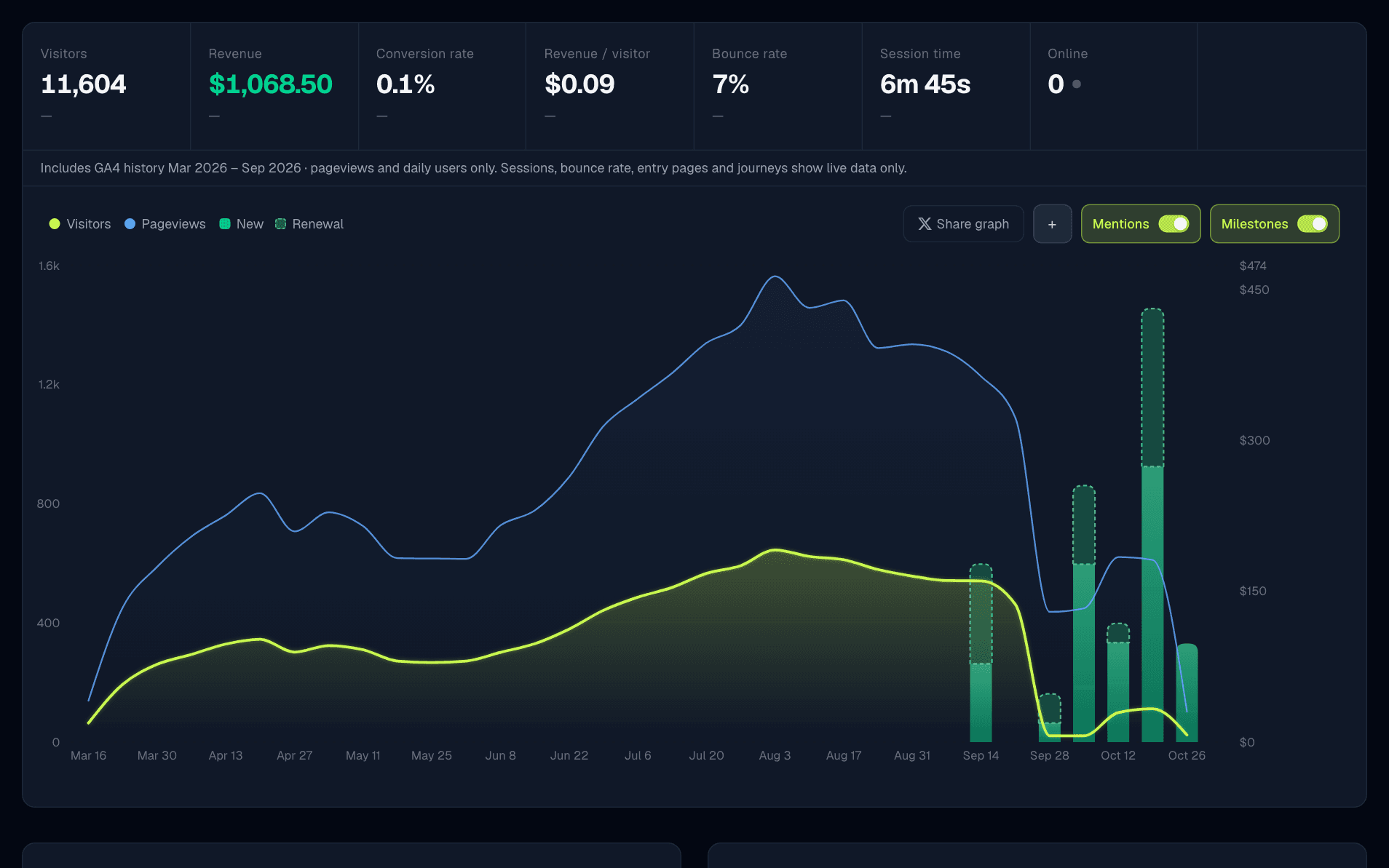
- Check the result. A note under the stats bar names the imported date range, and your charts show the full history for the range you select.
- Remove the GA4 tag from your site once you are happy with the numbers.
What gets imported, and what does not?
GA4 gives XPmetric daily totals, so that is what is stored. XPmetric does not invent visitors, sessions or times of day to fill the gap.
Imported, as daily totals
- Pageviews, in the stats bar, the chart and top pages.
- Visitors, as the sum of GA4's daily users.
- Top pages, referrers, browsers, operating systems and devices, ranked by pageviews.
Live data only
- Bounce rate and session time.
- Entry and exit pages, journeys and users.
- Goals, funnels and the live map.
- Custom GA4 events are not imported.
- Filters that need visit-level data, such as UTM, campaign, entry page and goal, hide imported history, and hourly views show live traffic only.
- Visitors are a sum of daily users, so someone who visits on three days counts three times in a range.
- Re-importing a day replaces that day's numbers. It never doubles them.
What does backdating do to my milestones?
Milestones are evaluated against the imported history and dated to the day each threshold was actually crossed, not to the day you imported. A site that already had a year of traffic starts with the milestones it has earned, on their real dates.
Levels come from real traffic and revenue, so imported history counts toward them too.
Common questions
Can I import my Google Analytics history into XPmetric?
Yes, on an active paid Growth plan. Connect Google Analytics, pick the GA4 property for the site and run the import. It covers up to two years (731 days) and runs in the background.
Can XPmetric change anything in my Google Analytics?
No. XPmetric asks Google for the read-only Analytics permission, which lets it read your Analytics data and change nothing.
Do I get individual visits and sessions from GA4?
No. GA4 gives XPmetric daily totals, so imported days are stored as daily aggregates. XPmetric does not invent visitors, sessions or times of day. Bounce rate, session time, entry and exit pages, journeys, goals and funnels come only from data XPmetric tracked itself.
Why might imported visitor numbers differ from GA4?
Imported visitors are the sum of GA4's daily users, so someone who visits on three days counts three times, and a range-level unique-user figure from GA4 can be lower. Live data comes from XPmetric's own tracking, which has its own bot filtering and visitor rules, so expect small differences where the two meet.
What happens if I import the same days twice?
Re-importing a day replaces that day's numbers. It does not double them.
Do my custom GA4 events come across?
No. Custom GA4 events are not imported. Set up goals in XPmetric for the events you care about, built on events XPmetric tracks itself.
Bring your history with you
Install the script first so new data flows in, then import your GA4 history on a paid Growth plan.
Start free trial14-day free trial · No credit card · then from $7/mo