See your whole portfolio in one view
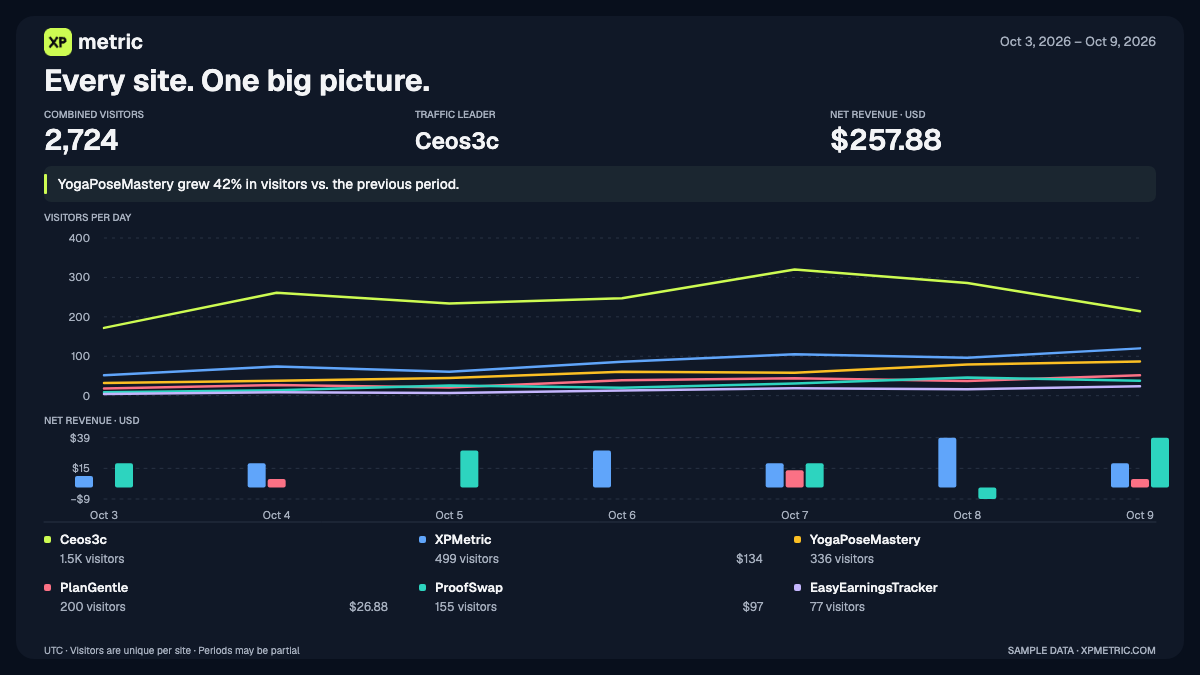
See which of your sites is bringing in visitors, which is growing, and where revenue is coming from without opening each dashboard.
Your dashboard now has a combined comparison beneath Your Sites. Every site gets a colored traffic line and matching net revenue bars, including refunds. Switch between visitors and pageviews, or use Growth to compare sites of different sizes from their first active point in the range.
The ranked legend lets you hide sites, focus on one with Only, or add a second site for a direct comparison. Hover over a date to see how your selected sites performed together. When there is enough evidence, a short observation highlights a notable pattern in your portfolio.
Want to keep the view or share it? Choose Share this view for a PNG preview with compact and roomy layouts. It keeps your selected sites, colors, period, and chart mode. Turn off revenue to remove amounts and revenue observations, then copy or download the image. Everything is generated in your browser.
Analytics that celebrate your wins. Free for 14 days, no card.
Start free trial →