← Changelog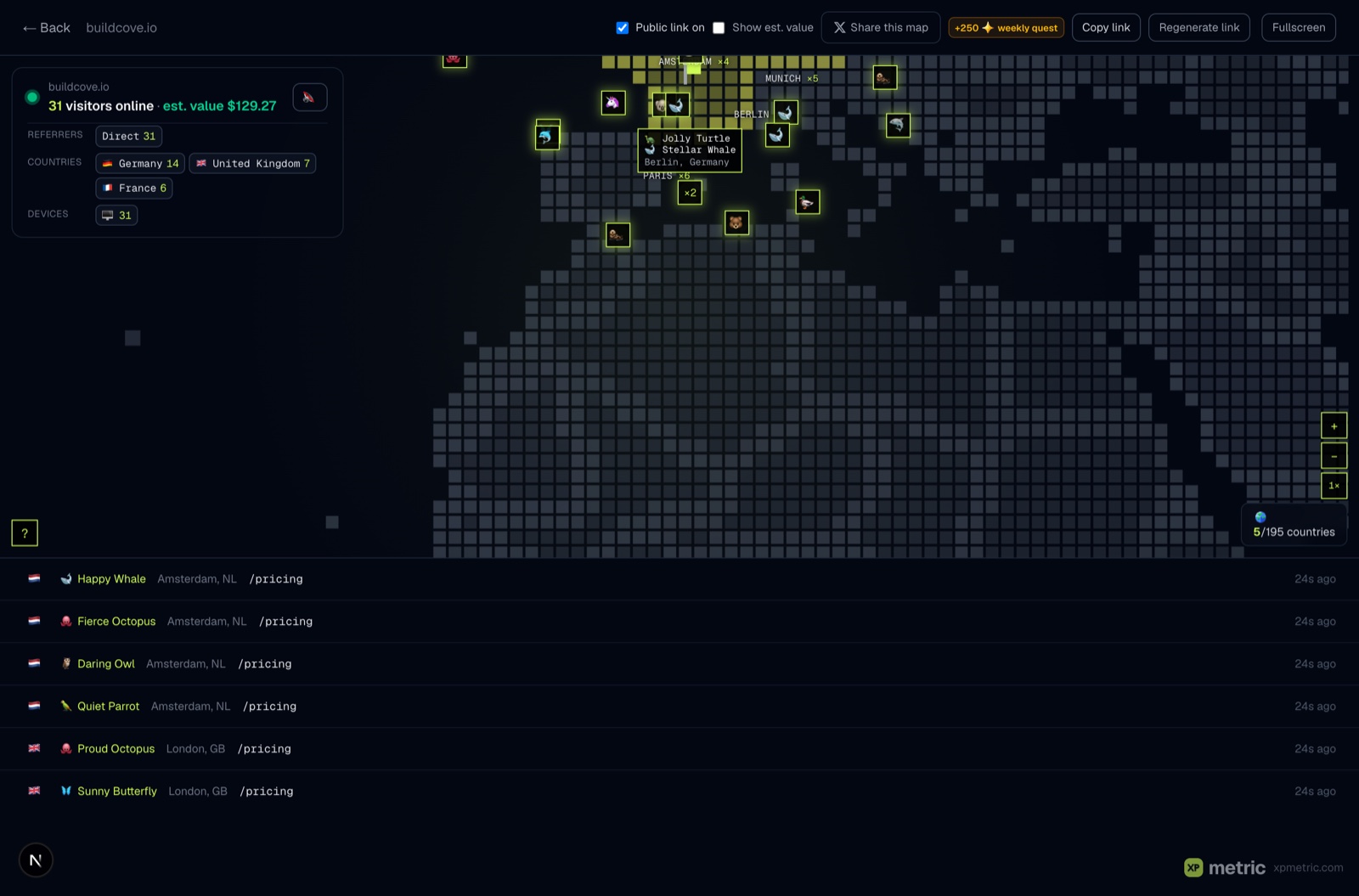
New
Zoom into your live map
The live world map now zooms. Point your mouse anywhere, scroll, and the map dives toward your cursor, up to 6× close. Once you're in, drag to pan around, double-click to jump closer, or use the pixel + / − / 1× buttons in the corner. On touch screens, pinch works the way you'd expect.
Why it's great
- Busy cities open up. A ring of visitors that overlapped at world view spreads apart as you zoom, so every badge is clickable without opening the roster.
- Everything stays sharp. The pixel world scales like proper pixel art, and visitor badges, city labels and event ripples keep their size instead of blowing up blurry.
- Your page never gets stuck. Scrolling down past the map still scrolls the page. The map only captures your wheel while you're actually zoomed in.
- Esc backs you out. One press closes an open visitor card, the next resets the view.
It works on the dashboard card, the fullscreen map, and your public share page, so anyone you send your live map to can explore it too.
This one was a direct request from a beta user. Keep them coming.
Analytics that celebrate your wins. Free for 14 days, no card.
Start free trial →